Map problems are hard to diagnose because almost none of them produce an error message. The map loads, or it does not, and the game says nothing either way.
Find your symptom here first. Guessing is expensive when each test costs a 25 minute pack.
Symptom table#
| What you see | Almost certainly |
|---|---|
| Map does not appear in the list at all | no expedition, or its contractType is wrong |
| Map with a custom model starts loading, then drops back to the main menu | the custom model’s name was never fixed after packing |
| Map appears, Deploy screen is blank or does nothing | no deploy zone the game can find |
| Map appears, Deploy hangs on the loading screen forever | a zone reference that points at nothing |
| Map loads, but it is an older version than you packed | two maps claiming one identity |
| A different map’s terrain loads | same as above |
| Zone settings are all empty when you open the map | the pack discarded them |
| A deploy zone worked yesterday, not today | same as above |
| Player cannot pick up loot from a zone | a space in the zone name |
| Delivering items to a construction zone does nothing | same as above |
| A bridge or construction zone never appears | same as above |
| Game crashes on a scouting objective | empty offset field |
| An objective’s reward never arrives | a reward type that does nothing |
| An expedition refuses to start | a required item that cannot be taken from HQ |
| A zone cannot be reached by truck or drone | drone-only set without drone-allowed |
| A completion message never shows | notification at the wrong level |
| Objective behaves erratically or inconsistently | two objectives share a name |
| Map shows “No Signal” as its picture | normal for every custom map |
| Terrain edits do nothing in game | you edited the masters, not the tiles, or you did not repack |
| A ported vehicle is solid black, wheels and all | its textures are SnowRunner-encoded |
A map with a custom model drops back to the menu#
The map starts loading, then the game returns to the main menu. It does not crash, there is no crash dump, and the log files are empty. Remove the custom model, pack again, and the map loads.
The game registers the model’s class from your map under one name and looks it up
under another, so it never finds it. Its own error, Terrain| Cant load Model Brand,
goes to a log that retail builds discard. Nothing about the model’s files causes this,
so landmarks, texture fixes, NeedPreload, renaming the files or following Saber’s
guide more closely will not help. Loading the map straight after packing, before the
fix has run, gives exactly this symptom too. Saber’s own sample model fails the same way.
Run python fix_map_model_brands.py <Level> --apply after every pack, with the game
closed. The full explanation is in
Custom models in a map.
If the map has no custom models, or the command reports “already” for every model
and the map still returns to the menu, look elsewhere. A save that holds an item from
a mod you have removed can also stop a map loading; that one leaves an SSL crash dump
naming CreateInventoryItem.
A ported vehicle is solid black#
A SnowRunner vehicle brought into Expeditions spawns, drives and steers correctly but renders completely black, including glass and wheels.
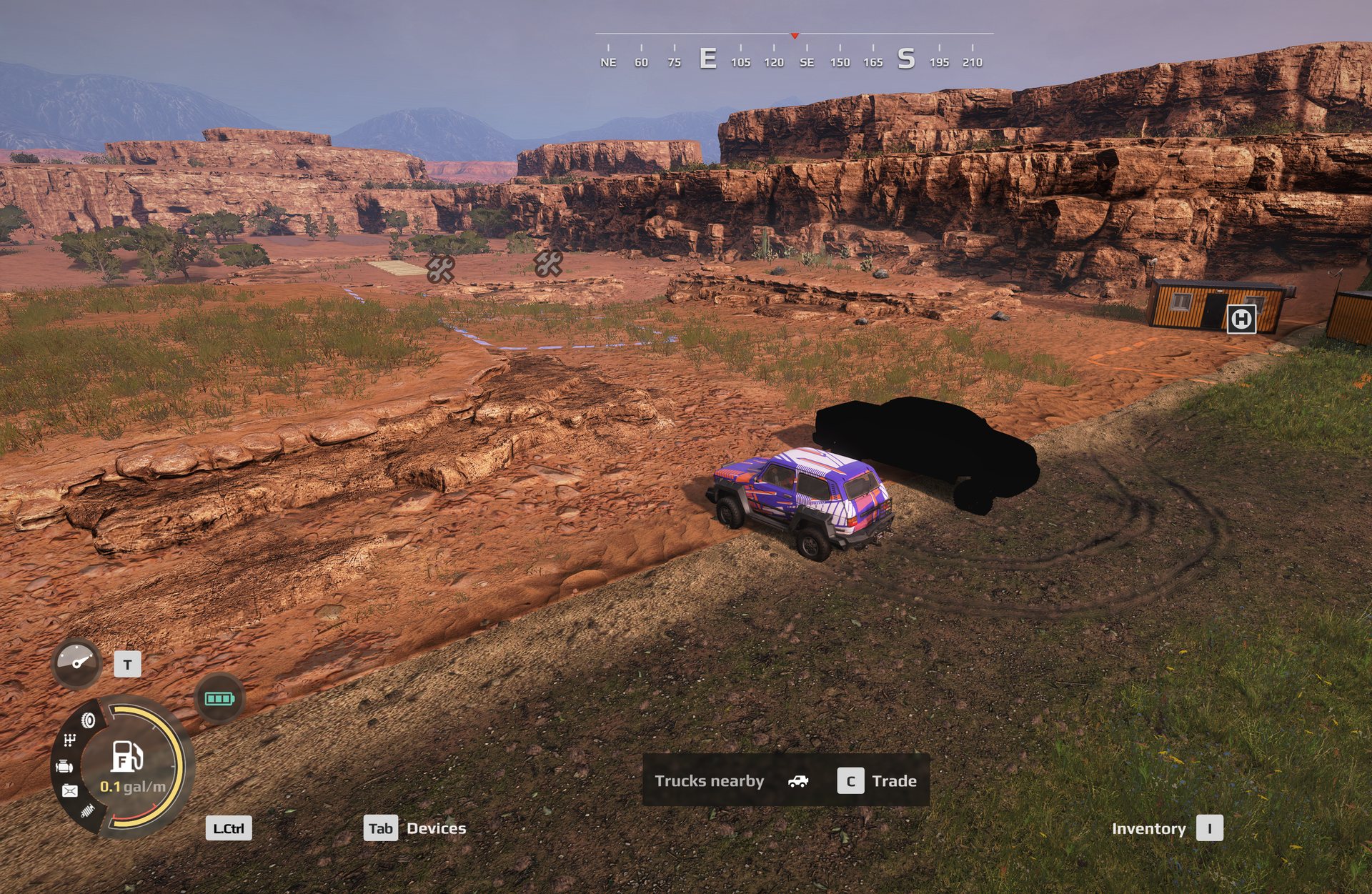
Its .pct textures were encoded by SnowRunner’s converter and Expeditions cannot
decode them. The log shows one line per map:
Failed to load texture textures/<modid>\trucks/<name>.tga
It asks for a .tga because that is the fallback after the converted texture
fails, and a packed mod does not ship source textures.
The container header is identical between the two games, so nothing about the
files looks wrong. Do not go hunting through pak layout, naming, the mod id,
modio.json, modStateList or texture sizes — all of those were eliminated
against a working mod on the same install.
The fix is to re-encode the textures with the game’s own
Sources\Bin\ResourceConverter.exe and rebuild pc.pak. Full method, including
the two traps in the converter’s arguments, is in
Porting a SnowRunner truck.
Separately, Mesh| Cant find material's part by name errors in the same log are
the mod author’s own defect and are cosmetic. They are not the cause.
The map is not in the list#
A map is only loadable with at least one expedition. Not a contract, not a task. An expedition.
Check contractType on your objective. 1 is an expedition, 0 is a contract. A
map whose only objective is a contract will not list.
The cheapest fix is a Free Roam expedition, which is one stage containing only
freeRoamInfo, and is worth having on every map anyway.
Also check that nothing stray is sitting in your Mods folder. Leftover files with
odd extensions beside your paks can stop the whole mod list from populating.
Deploy does nothing#
The map lists, you pick it, and the Deploy screen is empty or unresponsive.
The game cannot find a deploy zone. Three reasons, in order of likelihood:
- The Id does not match. The zone object in your scene and the settings record must carry character-for-character identical names. A capital letter or a trailing space is enough.
- The properties were discarded during the pack. See below.
ZonePropertyDeploywas never added. Placing a zone object does not make it a deploy point. The property does that.
Deploy hangs forever#
This one is distinct from the last, and the distinction matters: here the screen works, you pick trucks and crew, you press Deploy, and it sits on the loading screen indefinitely.
A zone reference in your settings points at a name that does not exist. The code that chooses your starting point dies, and it does so with no popup, no error and no log entry.
Check every zone name in your objectives and in your zone properties. References live in more places than you would expect: objectives, the modules attached to a deploy zone, the store and base links, and every assignment target.
A reference that was correct can also be broken by packing, if the pack renames zones and the references do not follow.
The wrong map loads#
You load your map and it is an older version, or it is a different map entirely.
Two maps are claiming the same identity. A map’s identity is a token in
user_name_of_map.txt, and if you created this map by copying another one, it still
holds the original’s name. The game loads whichever it resolves first, and you have no
control over which that is.
This is the single most disorienting symptom in map making, because nothing about “an old version of my map” suggests “a different map is impersonating it”.
Fix it by giving the copy its own identity everywhere that identity appears, or do not copy maps at all.
My zone settings vanished#
You open the map, or the zone tool, and zones that had properties now have none.
The pack can regenerate the zone list and drop the properties. Zone names survive, because they come from the objects in your scene, but the settings attached to them can come back empty.
This is why the habit matters: after every pack, check that your zones still have properties before you spend an hour testing in game.
If they are gone, restore them in the source and pack again. Patching the packed file works for one test and then evaporates the next time you pack.
Loot and deliveries do nothing#
The player stands in the right place and nothing can be picked up or dropped off.
The zone’s name contains a space. The game builds an internal reference for
anything holding items, and it splits that reference on whitespace. A zone called
Old Engine produces a broken reference; Old_Engine does not.
This affects every zone that items pass through: storage, airdrops, and construction zones. It does not affect a plain deploy point, because nothing passes through it.
You cannot simply rename them in the source, because the editor matches settings to your scene objects by those spaced names and will lose track of them. The working arrangement is:
- source keeps spaces, so the editor can find the zones
- packed map uses underscores, so the game can move items
- convert after every pack
Crash on a scouting objective#
Hard crash, not a hang.
localOffsetScoutingAreaRelativeZone is empty. This field cannot be left unset. If
you do not want an offset, you must still choose the Vector2d type and leave x and y
at zero.
This is the only outright crash in the objective system, and it is entirely avoidable.
The reward never pays#
The objective completes and the player gets nothing.
Check the reward type. Several look completely legitimate and do nothing at all. The
usual culprit is ContestResultRewards, which takes an amount and a time limit and
therefore looks exactly like a working money reward. It is not used in Expeditions and
never pays.
If it is an objective’s only reward, that objective pays nothing.
The full list of dead reward types is on the rewards page.
Also: truckDelivery with afterStageFinished: REWARD does not give the player the
truck. Use DESTROY and grant the vehicle through the rewards list.
The expedition will not start#
The player selects it and the game refuses, without explaining.
A required item cannot be taken from Headquarters. If an expedition lists an item in
requiredInventory, that item must have canTakeInHq enabled. Otherwise the player
cannot load it, cannot meet the requirement, and cannot start.
This bites custom items specifically, because the flag is easy to leave off when you make one.
A zone is unreachable#
The player cannot get there by truck or by drone.
visitWithDroneOnly is on but mayVisitZoneWithDrone is off. The first forbids
trucks. The second is what permits drones. With only the first, nothing can reach it.
If both are on and it is still unreachable, check the distance from the map edge. The default drone cannot fly within 170 m of the edge, and cannot climb more than 30 m above the truck.
The message never appears#
You wrote a notification and the player never sees it.
It is at the wrong level. For objectConstruction and visitAllZones, the
notification attached to the whole assignment does not fire. Only the notification on an
individual target does.
Move your text down one level, onto the target.
Two objectives with the same name#
Odd, inconsistent behaviour with no obvious pattern.
Objective names must be unique across expeditions, contracts and tasks. A task and a contract sharing a name produces undefined behaviour rather than an error.
This happens most often after duplicating an objective to make a variant and forgetting to rename it.
A stage can never be completed#
The player finishes everything and the stage does not close.
Check whether every assignment in that stage is marked OptionalToPerform. A stage
needs at least one required assignment, and a stage made entirely of optional ones is
invalid.
No Signal instead of a picture#
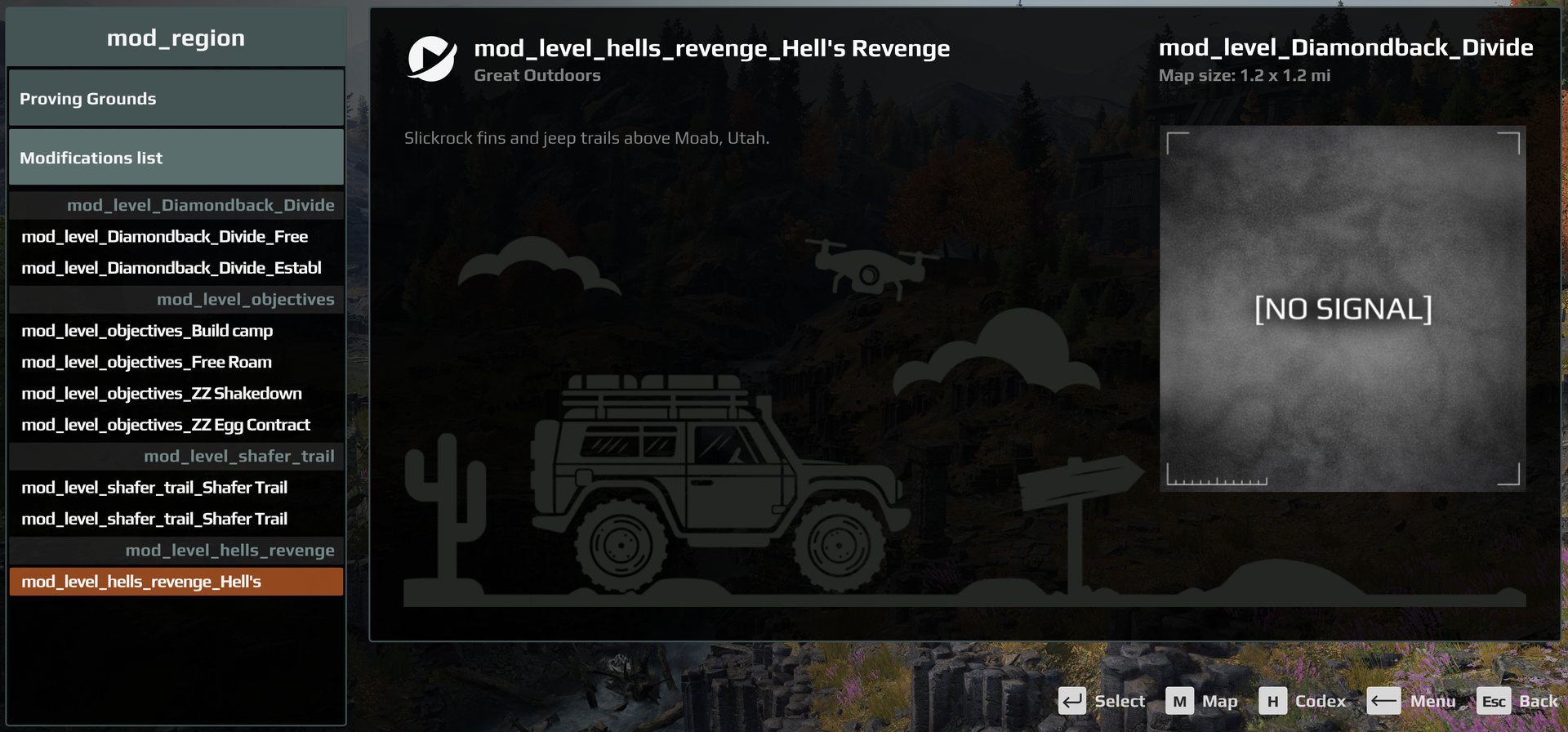
Your map shows the “No Signal” placeholder on the selection screen.
Every custom map shows this, and nothing in the map can change it. Saber’s guide says to
set uiMinimapScreenshot to a 400 x 400 PNG, but a map set up that way still showed no
image. tested in game The game’s scripts never read
that field. The picture comes from the game’s own image library, which has one entry per
vanilla map, and any other map falls back to No Signal.
measured
What it looks like: custom maps listed on the selection screen, with the No Signal placeholder where the map’s picture should be.
Diagnosing when the table does not help#
Two places the game does record something:
base\logs\ModMapError.txt is written by the game’s own validator when you pack.
Most other logs in that folder are empty, so check this one specifically.
base\ssl_crash_dump\ssl_dump_*.json is written on a crash. The first entry in its
callstack names the script function that failed, which is usually enough to work out
which field is at fault.
Beyond that, the most useful habit is to inspect the packed file directly rather than the source. It is an ordinary zip archive. Open it and read the JSON inside. What the game sees is what is in there, and comparing it against what you think you built settles most arguments in about a minute.