Store and garage artwork#
A vehicle can render perfectly, drive perfectly, and still look like someone else’s truck everywhere the UI shows a picture of it. None of these fields logs anything when it is wrong, so the only way to find a mistake is to open the store and look.
The fields#
measured across the game’s 44 stock truck classes
| field | size | kind | where it shows | stock trucks declaring it |
|---|---|---|---|---|
TruckImage |
380×92 | cut-out, RGBA | the card in the truck list | 44 / 44 |
TruckImageSmall |
124×52 | cut-out, RGBA | compact list variant | 1 / 44 |
UiIcon328x458 |
328×458 | scene photo | store list thumbnail | 42 / 44 |
UiIcon576x640 |
576×640 | scene photo | large store preview | 43 / 44 |
uiIcon576x640Bw |
576×640 | scene photo, greyscale | greyscale variant | 1 / 44 |
UiIconLogo |
80×80 | badge | manufacturer badge | 42 / 44 |
UiIcon40x40 |
— | shared glyph | fleet tab, top of truck selection | 44 / 44 |
UiIcon30x30 |
— | shared glyph | fleet tab, small | 44 / 44 |
TruckImage* live in <TruckData>. The UiIcon* live in <UiDesc>.
Note that UiIcon328x458 is absent from the editor’s type schema and is used
by 42 of the 44 shipped trucks. Schema absence is not invalidity — check what the
game’s own content does before concluding a field is wrong.
The two rules that cost the most#
A cut-out slot needs alpha, and an opaque screenshot renders as nothing#
TruckImage and TruckImageSmall are composited into the UI. They must be RGBA
with the vehicle isolated on transparency. Put a rectangle of garage scene in
one of those slots and the card is simply blank — no error, no fallback.
The store slots are the opposite: they are ordinary opaque photographs, exactly like every stock truck’s.
A field that is ABSENT is never fixed by substitution#
TruckImage* live on <TruckData>, and 43 of 44 stock trucks omit TruckImageSmall
Tooling that repoints image fields usually substitutes field="..." where it
finds it. That silently does nothing when the field is absent, and the
result is a pak that ships the PNG with no field pointing at it — no error,
no fallback, just an empty slot.
UiIcon* go on <UiDesc>; TruckImage and TruckImageSmall go on
<TruckData>. Insert into the right element, anchored on the tag that
already carries TruckImage — a truck class can hold several <TruckData>
elements and only one of them is the right one.
measured
Diffing a working mod against a broken one left exactly this difference:
the working one declares TruckImageSmall and the broken one shipped the
PNG with nothing pointing at it.
What this did NOT turn out to explain
It is tempting to conclude from that diff that TruckImageSmall feeds
the fleet tab. It does not. With the field correctly declared on
three vehicles, the tabs still render the shared category glyph. The
fleet tab is UiIcon40x40/UiIcon30x30, and restoring the shared
sprite is what filled it. TruckImageSmall’s real consumer is still
unidentified — one stock truck in 44 declares it at all.
The fleet tabs are shared, and giving a vehicle its own empties them#
Never point UiIcon40x40 / UiIcon30x30 at a per-vehicle image
All 44 stock trucks point these at a shared category glyph —
scoutVehicleImg ×27, offroadVehicleImg ×13, heavyVehicleImg ×2 — and so
does every working mod. Those names resolve and draw the little grey truck
icon you see in the tabs.
Repointing them at a unique name and shipping the PNG produces an empty tab. The other image fields do resolve shipped files; these two do not.
Inherit the glyph for your vehicle’s category and leave the fields alone.
Composing the shot#
python vehicle_ui.py --howto
That prints the whole recipe. In short:
- Three-quarter front, roughly 30–45° off the nose. Every stock card and every working mod uses that angle.
- Fill the frame. You cannot zoom in afterwards without losing resolution.
- Keep the vehicle clear of the left-hand truck list and the bottom-right button row.
- The Customize screen (
F) is often better lit and has no stats panel over the scene.
Then:
python vehicle_ui.py mod.pak out.pak --shot shot.png --name Tundra \
    --box 1500 760 3830 2010 --safe 1560 330 3830 1808 --badge TRD
--box only has to contain the vehicle — the tool mattes it and measures the
real silhouette, so a generous box is safe and a tight one is not. Too small is
the only real mistake: it clips the roof or the bed, and nothing tells you.
--safe is per-shot, and it is where the HUD gets baked in
The store portraits are cropped from the scene, so any button or label
inside --safe ends up in the artwork. Where the HUD sits relative to the
vehicle changes per truck: a long-nosed truck reaches under the M Map
row, so you crop above it; a short one does not, so you cut the right edge
instead. Decide it from your own screenshot.
A scene object touching the bodywork survives the matte
A crate or post standing against the vehicle shares an edge with it, so
neither the matte nor a largest-blob filter can tell them apart —
morphological opening does not sever it either. Paint it out at source with
--exclude L T R B, which is repeatable.
Matching the stock cards#
Custom cut-out cards in the game’s truck list, beside stock ones. The Jeep Wrangler RC and Jeep Renegade RC cards were made this way; DON 71 and TUZ 16 below are stock.
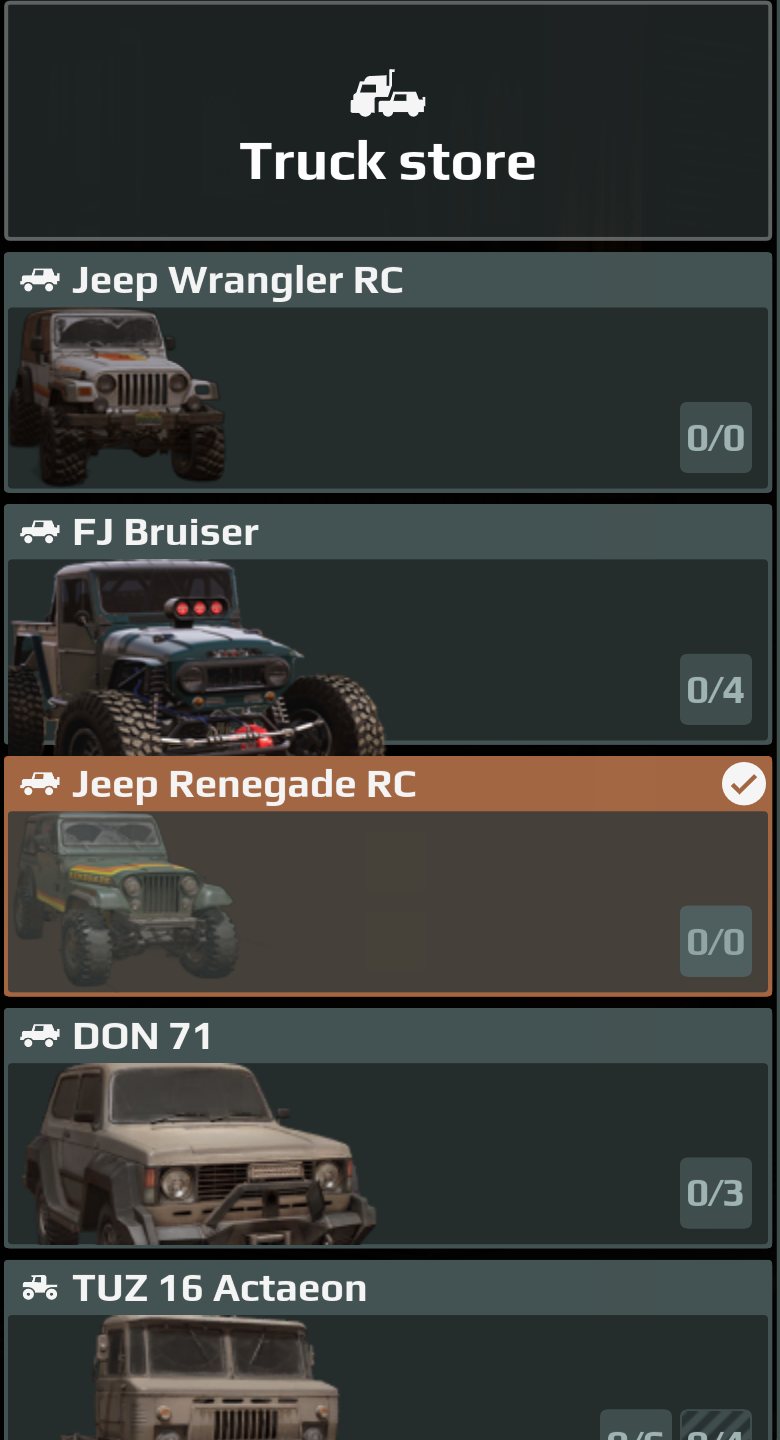
measured Stock cards are zoomed in far enough to crop at the bumper. Fitting the whole vehicle inside the frame is the obvious thing to do and it looks visibly small next to them.
The only readable reference is a mod that ships real files instead of inheriting atlas sprites: its card is left-aligned, with the content spanning 50% of the width and overflowing the frame vertically rather than being fitted inside it.
Two things follow, and the second one is easy to get wrong in the other direction.
Draw the vehicle about 1.4 frame-heights tall, anchored TOP. Not centred.
Centring splits the overflow and crops the windscreen off the top, which looks
wrong no matter how good the zoom is. Anchoring the top keeps the roof,
windscreen and grille and drops the whole overflow off the bottom, so the cut
lands at the bumper. cutout(..., fill=1.4) is the knob.
The canvas is 380×92, and a taller one hangs over the border
measured The widget is 768×192 — exactly 4:1 — and it scales the image to its WIDTH. A 380×92 card is 4.13:1 and arrives 186px tall, sitting inside the box. A 380×110 card is 3.45:1 and arrives 222px tall in a 192px box, so the vehicle visibly hangs over the bottom border.
Copying the 380×110 from the reference mod is exactly how that happens. Use the stock 380×92.
Stock TruckImage names such as don71mchr are atlas sprites and exist
nowhere as files, so you cannot open one to compare. A mod that ships its own
PNG is the only ground truth available — and, as above, it is not right about
everything.