A distribution grows plants across an area you paint, instead of placing them one at a time. It is how forests, grass, scrub and scattered stones get onto a map. documented
How much of this is tested
Painting distributions with the game’s own brushes is Saber’s documented workflow and is how working maps are dressed. The file layout below was read off a working map. Custom plants have been converted and checked standing and swaying in the editor; whether a packed map carries everything a custom plant needs is not yet known.
What a distribution is#
A distribution joins two things: documented
- a map, an image that records how dense the plants are everywhere on the level
- one or more brushes, which say which plants grow there
You paint the map; the brushes decide what appears. Brushes are not only plants. Saber notes that stones and debris are planted the same way.
Use a distribution for anything there are many of and whose exact positions do not matter: trees, grass, bushes, pebbles. Place by hand anything whose position matters to the player, anything a truck should meet in one particular spot, or a composed scene. See Models, rocks and cliffs.
Making one#
Add it#
Right-click the terrain (or the Distributions section of the Scene View) and choose Add Distribution. An empty one appears.
Create its map#
Click the Map field, then its browse button, and name a new file. The name must
start with dstr_ and end with .tga, for example dstr_aspens_1.tga. Opening it
creates the file and shows the painting brush.
Choose its brushes#
Click [press] next to Edit in the Brushes section, move the brushes you want from Available Brushes to Selected Brushes, and click OK.
Paint, then rebuild#
Paint the map (see below). Nothing appears until you rebuild: right-click Terrain in the Scene View and choose Rebuild Terrain.
documented
Painting density#
The brush has three modes. documented
| Mode | What you paint |
|---|---|
| Density | how many plants grow. Value above 0.50 adds, below 0.50 erases |
| Scale | how big they are. Value sets the size |
| Density subgroup | density for every distribution in a group at once. Expeditions only, and Saber calls it new and not very stable |
A value of exactly 0.50 paints nothing
In Density mode the brush adds above 0.50, erases below it, and does nothing
at exactly 0.50. A brush that “does not work” is often sitting on the middle.
documented
Other brush settings are Size, Value, Falloff (how softly the strength drops off from the centre), Autofade, Randomize (plants unevenly) and Update Material, which Saber says not to use for distributions.
Saber’s recommended values#
documented
| Painting | Density Value |
|---|---|
| plants | 1 |
| rocks and debris | 0.7 |
| canes | 0.6 |
Keep Falloff close to 0. For more chaotic rocks, paint Scale with Size 0.6,
Value 1.0, Falloff 0.07, Autofade off and Randomize on.
The higher the mountain, the smaller the trees. On distant high ground Saber suggests mature trees at a lower scale, so they drop out at a greater distance and the mountain’s silhouette stays visible longer.
Keeping it out of roads, water and mud#
Each distribution has three switches: documented
| Setting | false (the default) |
|---|---|
| Ignore Overlays | plants do not grow on roads |
| Ignore Water | plants do not grow under water |
| Ignore Mud | plants do not grow in mud |
With the defaults left alone, the forest stops at the water. A forest distribution painted over a whole real-terrain hill leaves the river channel bare, and a clearing erased on the summit stays open.
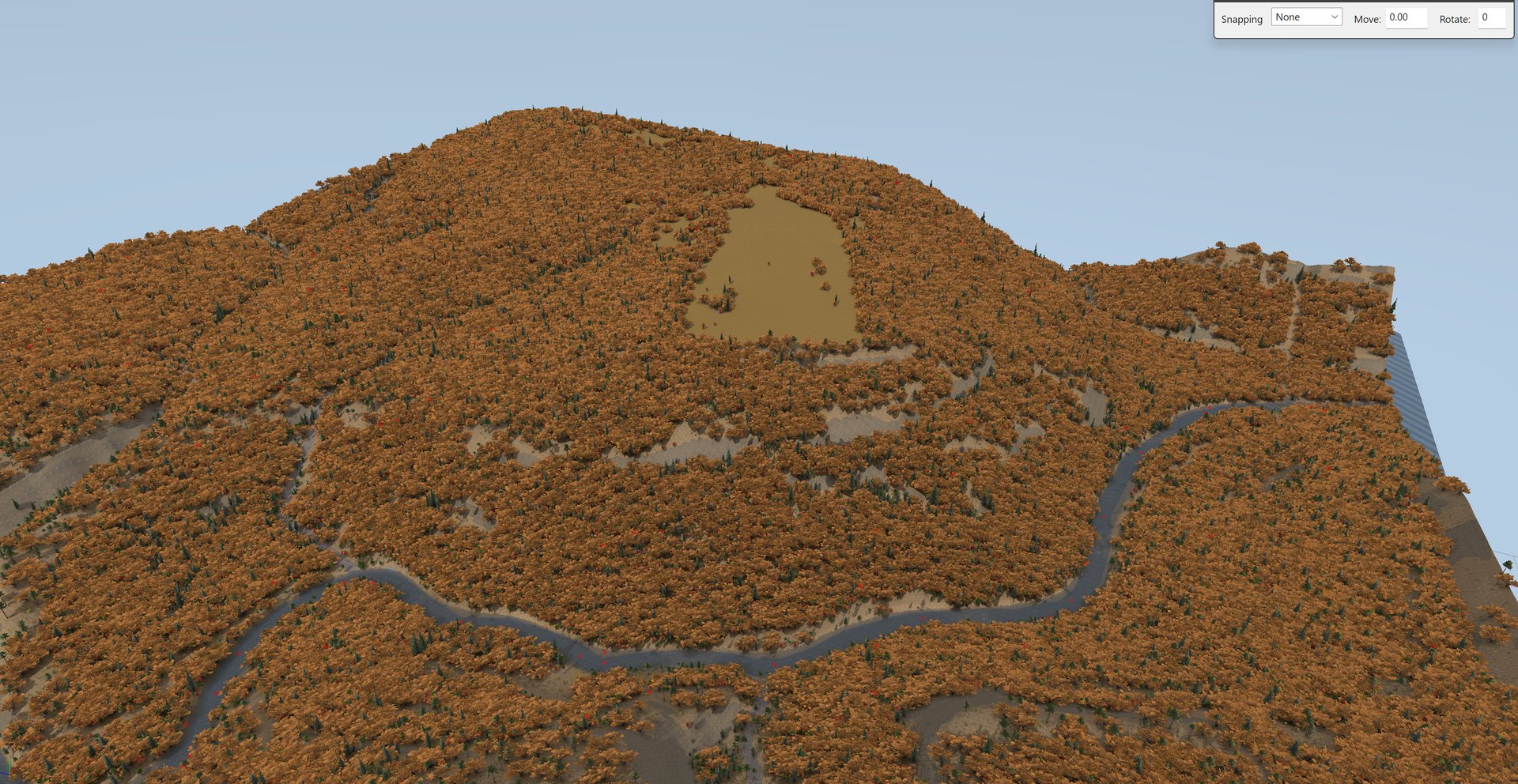
Leave them false unless you really want grass through a road. This only covers the
distribution. Rocks and objects placed individually are not kept off roads by it;
see Models, rocks and cliffs.
Making it look natural#
Nothing in nature is evenly spaced, and evenly spaced scatter reads as artificial straight away. Real vegetation clumps where conditions suit it, with gaps between. A flat, even density across a hillside looks machine-made however good the plants are.
What helps:
- Vary the density as you paint. Denser in hollows, thinner on ridges and dry ground, gaps around rock and clearings. Use Randomize for unevenness at small scale.
- Mix brushes on one map. One distribution can carry several brushes, so one painted area grows trees and small trees together in the brushes’ own proportions.
- Use several variants of a plant. A brush picks among its plant types for each instance, so four variants read far better than one repeated.
- Change the Seed to reshuffle. Each distribution has a
Seed. A new one rearranges the plants without repainting. - Follow the ground’s aspect. Many vanilla brushes come in a green and an autumn
version: names ending
_gare the green variant, soMaplesGreenis the green form ofMaples. On one map, green maple and hemlock on cool north slopes against gold oak on dry south slopes matched what those hills look like in autumn.
Density is also drivability#
A truck cannot push through trees. A forest painted uniformly dense is a map with no offroad route through it. Thin the canopy where a player should be able to pick a line, and keep it closed where they should not.
Slope#
No slope limit is documented for a distribution. Two things are available:
- in a brush,
Perpendicularitydecides whether plants stand upright (1.0) or lean with the ground (0), andDivergenceadds random lean - the density map is a plain image, so it can in principle be generated from a slope or elevation band rather than painted. unverified as a finished workflow
Grass under trees#
Expeditions’ Terrain Properties have an Obstructed grass persistence multiplier, which affects grass planted by distributions inside large groups of trees. documented
Where it is all stored#
| Piece | Where |
|---|---|
| a brush | the game’s brushes.xml, plus your own in Media\classes\editor\brushes_custom.xml. The editor lists both together |
| a distribution | Media\prebuild\<level>\subgroups\Distribution_<name>.xml |
| its density map | Media\prebuild\<level>\data\<col>_<row>\dstr_<map>.tga, one image per terrain tile |
Three things here mislead people:
- Distributions are not in the level XML. It holds an empty
<Distributions/>on every map, shipped ones included. They live insubgroups\. Looking in the level file finds nothing and reads as “the editor lost them”. - The map name is free-form, and nothing checks it. A typo paints into a map no distribution reads, which looks exactly like “the plant does not work”.
- Close the editor before touching any of these files. It holds them and writes
over your changes when it closes. Subgroup files must also keep LF line endings,
and a backup left in
subgroups\is loaded as an empty group. See Models, rocks and cliffs.
A brush entry looks like this. PlantsPerBlock is the count per 24 m block at full
density, and MinSize/MaxSize multiply the plant’s own size, they do not
normalise it:
<DistributionBrushes>
  <Plants>
    <Mullein PlantsPerBlock="700">
      <PlantType Brand="mullein_01" Divergence="0.08" MinSize="0.8"
                 MaxSize="1.2" MaxMapScale="0.5" Perpendicularity="1.0" />
    </Mullein>
  </Plants>
</DistributionBrushes>
Your own plants#
A plant from outside the game can be added as a brand and given a brush. What has been learned building them:
- Foliage is flat cards, not solid geometry. An image-to-3D generator makes a solid lump with a photo wrapped round it. One generated plant was 58,226 triangles and 18 times the size of the median shipped plant; the same species built from alpha-cut photo cards was 26 triangles. Build plants from cards.
- Export Z-up and rotate nothing. The engine is Y-up, but the converter does the conversion itself, so give it Blender’s native Z-up with no rotation on the nodes. Both obvious “fixes” laid plants on their sides. The tell is not a missing top: it is upright parts lying flat and flat parts standing up.
- A plant at distance is a billboard, which needs two copies. If a plant looks
perfect up close and turns into a solid red cone further away, its billboard
texture is missing from
prebuild\textures\dds\. And a billboard is a render of the mesh, so after rebuilding the mesh, rebuild the billboard too. - Name the mesh object
plant, and give it one more LOD distance than the same geometry would have as a model, because the billboard is generated as an extra LOD. - Wind is on by default. Anything marked as foliage sways.
WindAnimation="false"is how the game switches it off, for debris that must not move. - Declare real heights. Because
MinSize/MaxSizemultiply, variants built at different sizes come out visibly mismatched in one brush.
A custom card plant in the editor, before and after the fix. The same patch of a distribution first drew as red cones where the custom plant could not be drawn, then, rebuilt, as Mullein plants standing with their flower spikes up.
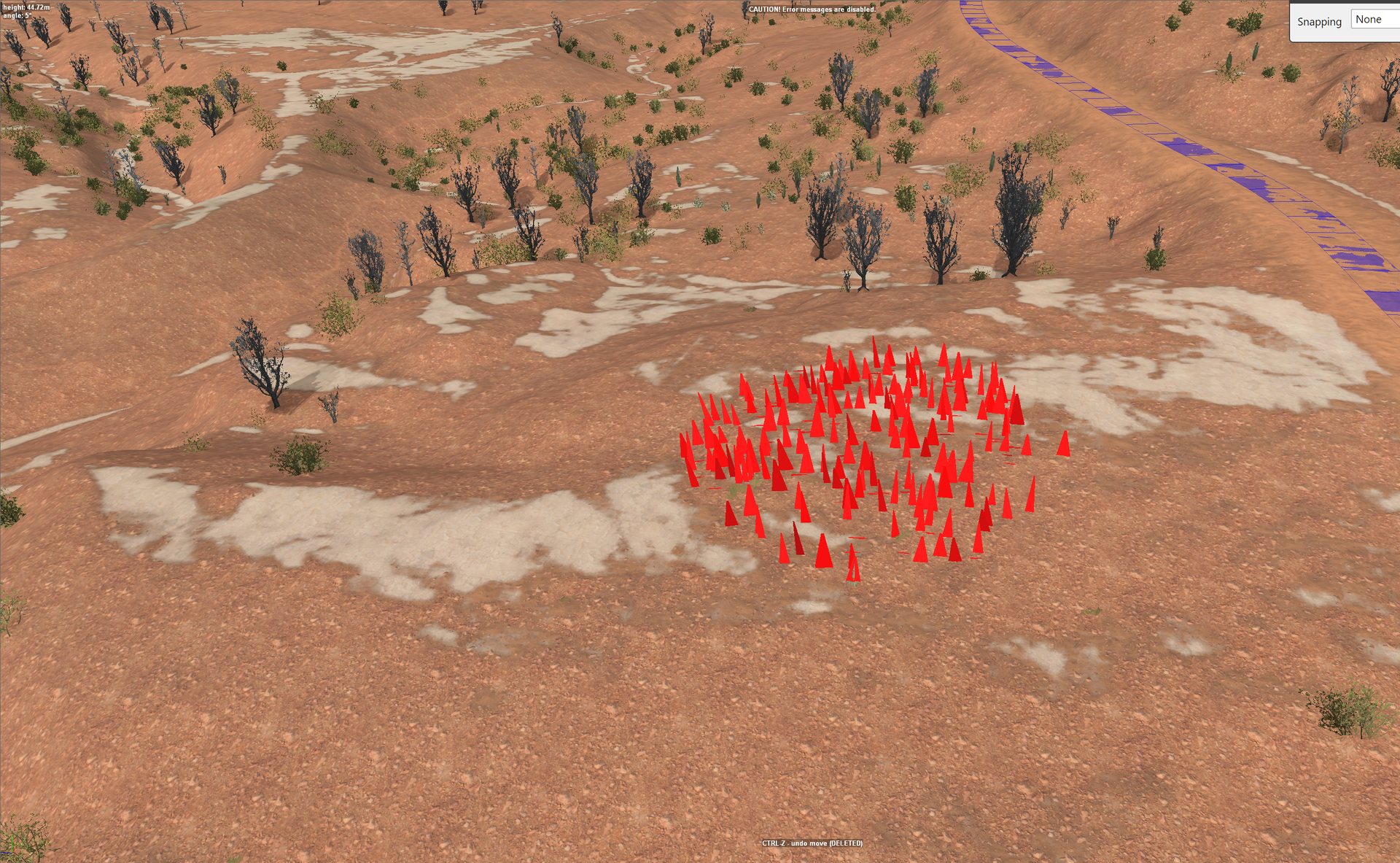
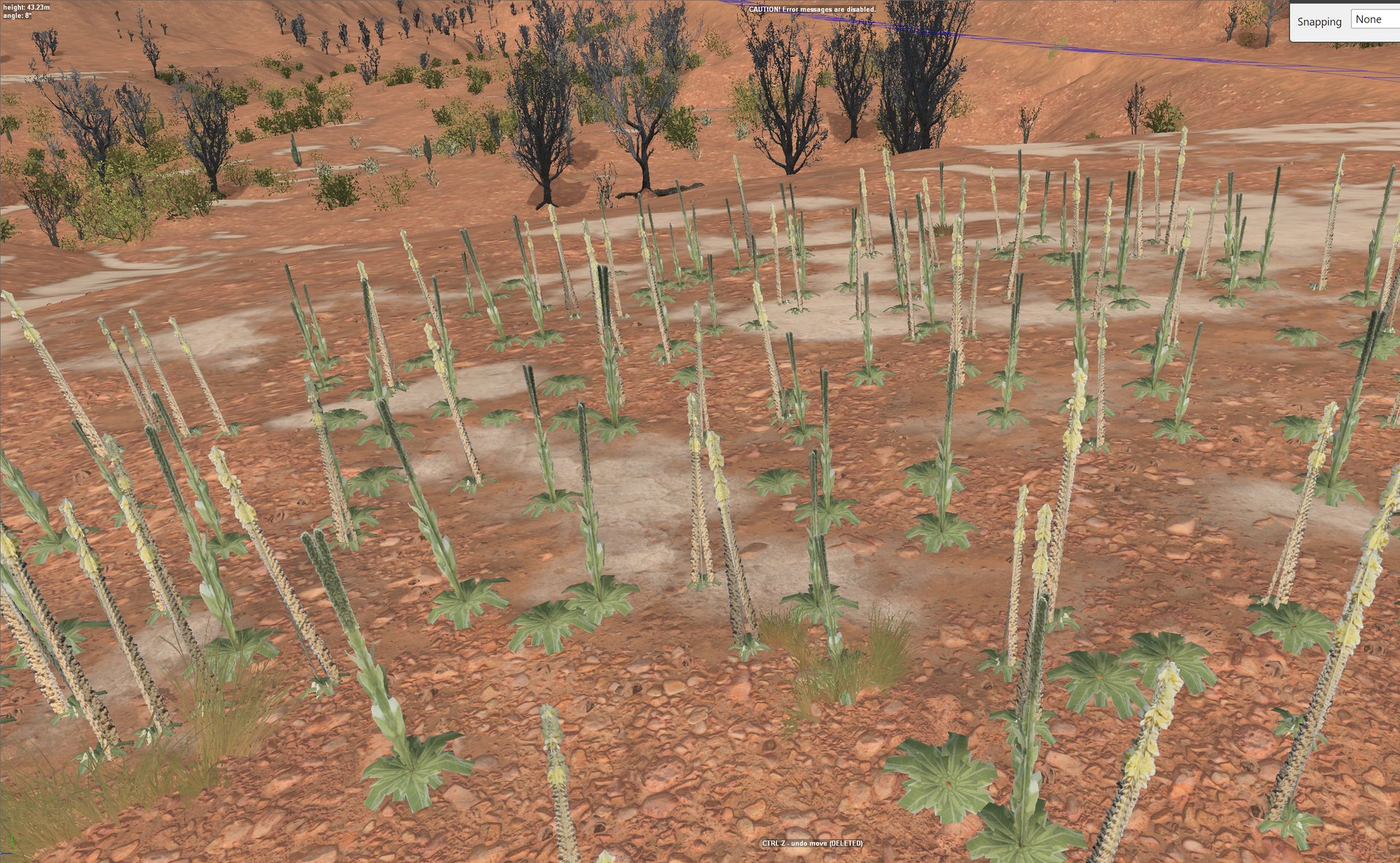
The toolkit builds card plants and checks these for you; see The toolkit.
What is not known yet#
- what a packed map needs for a custom plant’s billboard to appear in game
- whether a scripted density map from a slope band works end to end
- how stable Density subgroup mode is in practice