Porting a SnowRunner truck#
Doing a port? Start with the runbook.
Porting runbook, start to finish is the ordered procedure with every trap at the step where it bites. This page explains why the big one happens, and is worth reading once.
Expeditions and SnowRunner are both Saber engine games and they share one mod format. Saber’s own documentation covers truck modding for both titles in a single section, which tells you how close they are.
So a SnowRunner vehicle mod can be brought into Expeditions. People already do it — BFW, iX-5 and ULM C10 are community ports. But there is one asymmetry that costs most people their first attempt, and it is worth understanding before you start.
The one thing that breaks#
Meshes port untouched. Textures do not.
A published mod contains compiled geometry and converted textures. The geometry is cross-compatible: drop a SnowRunner truck into Expeditions and it will spawn, drive, steer and articulate its suspension perfectly.
Its textures will not load, and the vehicle renders solid black — body, glass, wheels, everything.
A ported SnowRunner pickup in a running game, before re-encoding. It drives, but every surface is black.
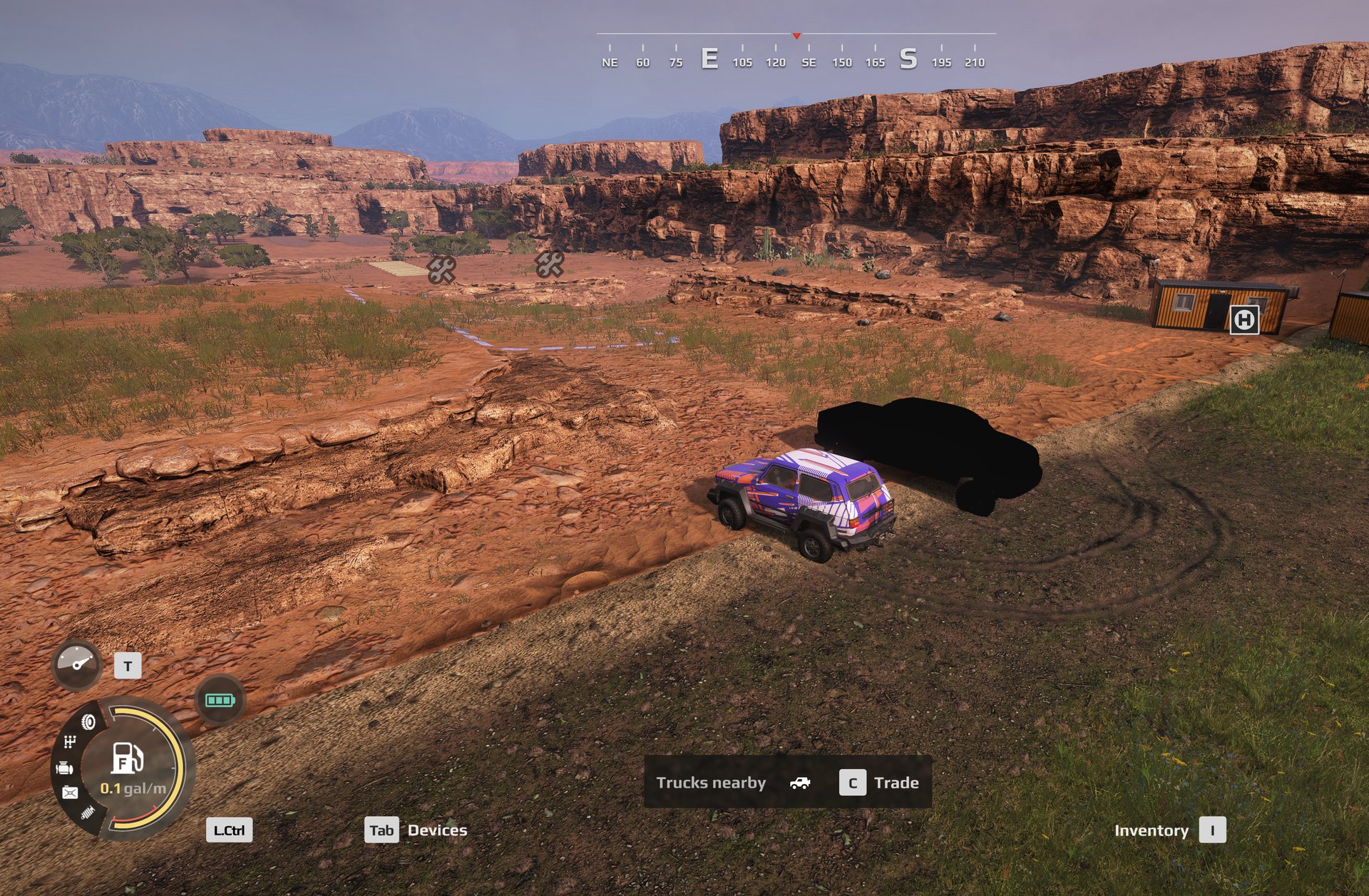
The log says:
Failed to load texture textures/<modid>\trucks/carroceria__d_a.tga
The reason is that the mod’s .pct textures were encoded by SnowRunner’s
converter, and Expeditions cannot decode them. When a texture fails, the engine
falls back to looking for the source .tga, which a packed mod never ships. So
every material on the vehicle ends up with no albedo at all.
measured
The .pct container header is byte-identical between the two games: magic
TCIP, version 258, header size 32, same width and height fields. You cannot
tell a SnowRunner texture from an Expeditions one by looking at it. The truck
going black is the only symptom you get.
What is not the cause#
This took two days to find, and the reason is that the mod looks correct in every respect that is easy to check. If your truck is black, do not go looking at:
pak layout · file naming · letter case · the mod id · modio.json fields ·
modStateList · signature.cache · texture dimensions · missing material
targets · the mesh container · customization presets
Every one of those was tested against a working mod on the same install, and every one had a counterexample — a mod that got it “wrong” and rendered fine. None of them matter. The problem is in the texture payload bytes.
Equally, do not try to decode the .pct. The payload is the right size for
BC3 with a mip chain but is swizzled or proprietary; a correct BC3 decode scores
under 15 mean error against a known source image, and every byte offset in the
file scores about 66, which is noise. --extract-textures also returns nothing
useful. You do not need to decode anything — you re-encode instead.
First check whether you need to re-encode at all#
Not every mod you download is SnowRunner-encoded. Some are already Expeditions mods, and some have been converted before you got them — and re-encoding one of those from generated flat colours would destroy the artist’s livery to fix a problem it does not have.
measured You can tell without launching anything, because the two encoders differ by a constant 10 bytes on the same source:
| texture | SnowRunner | Expeditions |
|---|---|---|
rim_scout_narrow_1__d_a |
349,712 | 349,702 |
rim_scout_narrow_1__n_d |
1,398,296 | 1,398,286 |
tire_scout_narrow_3__d_a |
699,232 | 699,222 |
So file size alone classifies a .pct, given a reference set from each game.
The game’s own sample mod provides the Expeditions set for free.
On one 111-texture mod this showed 98 exact Expeditions matches, 2 more sitting
at SnowRunner-minus-10, 11 _uncmp variants in a separate format class, and
zero SnowRunner-encoded files. The entire re-encode step was skipped and the
author’s artwork was left untouched.
Do not skip this check because the header looks right. The container header is byte-identical between the games, as above — the payload length is the signal.
The fix#
Hand Expeditions textures that its own encoder produced. The game ships that
encoder: Sources\Bin\ResourceConverter.exe.
The whole process is: work out which textures the mod’s materials ask for, write
a source .tga for each one, run them through the converter, put the results
back into pc.pak, and install.
The same pickup, at the same base, after its textures were re-encoded with the game’s own converter.
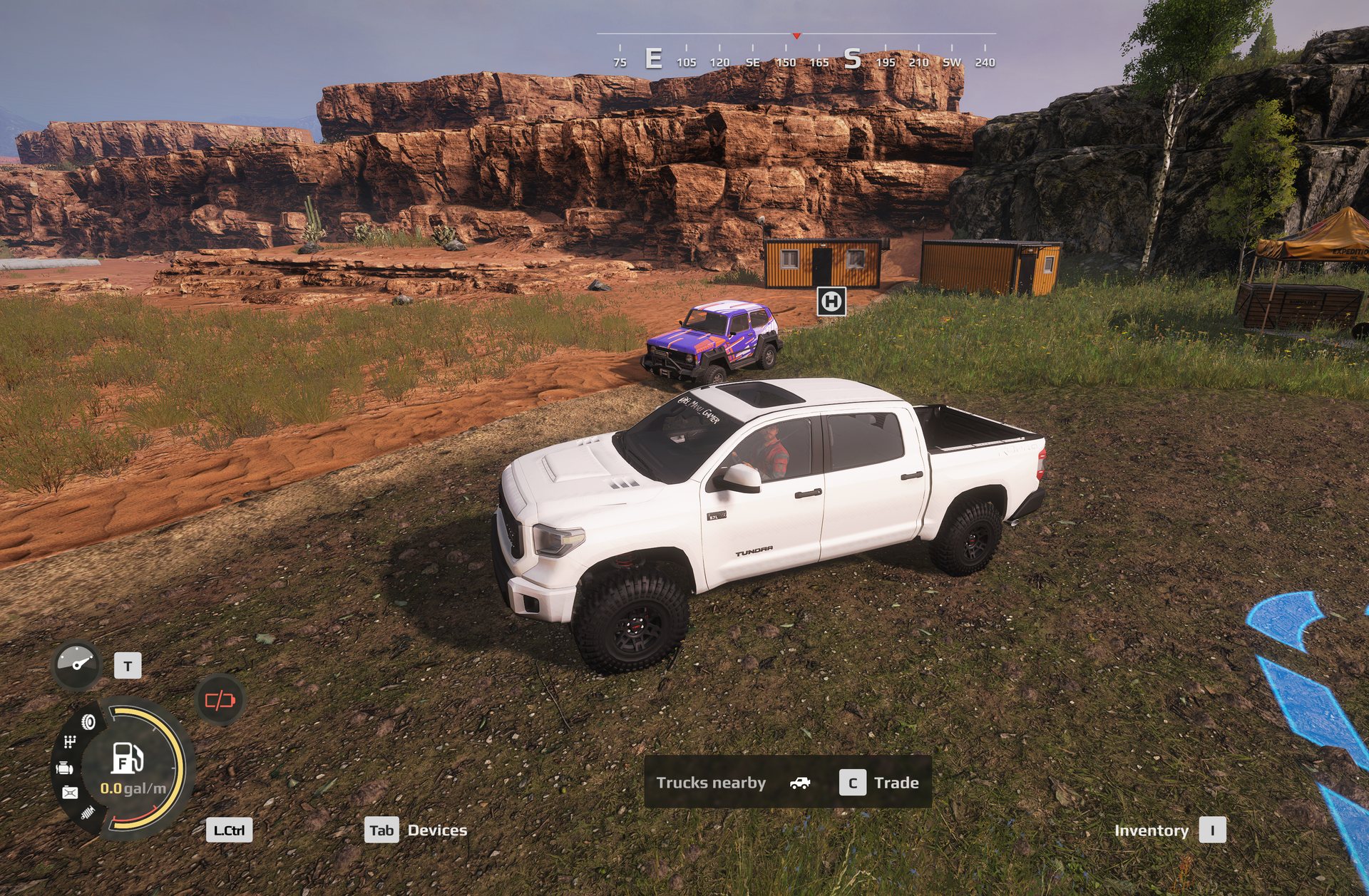
With the tool#
python port_vehicle.py analyze <mod.zip>
python port_vehicle.py port <mod.zip> --id <modid> --name "My Truck"
Run analyze first. It tells you how many materials it has a colour for, which
ones it does not, and which materials the mod’s author declared but never
actually put in the mesh.
port then does the rest and installs to .modio\mods\<id>\. See
the AI tools section for the flags.
By hand#
The invocation has two traps in it, and both produce errors that point at the wrong thing:
ResourceConverter.exe --all-pct -s -r <modRoot> -i textures/trucks/X.tga -o prebuild/textures/pct/trucks_X.pct
-iis resolved relative to-r. Give it an absolute path and it answersUnable to find texture file <path>about a file that is plainly sitting there. The message means “not underneath-r”, not “does not exist”.-ois resolved against the working directory, not-r. The output lands next to the executable inSources\Bin\prebuild\. Collect it from there and delete the folder — it is inside your game install.-sis not optional. Without it, an assert can open a modal dialog on your desktop and wait for a click that never comes.
Then rebuild pc.pak with the new .pct files in prebuild/textures/pct/, and
install three files to .modio\mods\<id>\: <Name>.pak, a file named literally
pc.pak, and modio.json.
Write zero extra fields when you repack
pc.pak is a plain zip, but Python’s zipfile copies ZipInfo.extra into
the local header as well as the central directory, and the engine then
fails to read that member. Build fresh ZipInfo objects. Validate by
inflating every member afterwards.
TGA rows go bottom-up. This one costs days.
The engine’s .tga files store pixel row 0 as the bottom row — the
descriptor’s origin bit is clear. Write them top-down and every texture is
vertically flipped.
That is invisible on a flat colour and on a tiled camo pattern, and it completely scrambles a real UV atlas: the wrong region of the image lands on every panel. So a generated-skin vehicle looks perfect and hides the bug until you port one with genuine artwork.
The game hands you the test for free. The sample mod ships a source .tga
next to the .dds the game converted from it:
tga read as-stored vs its own dds : MAE 52.4   wrong
tga read flipped   vs its own dds : MAE  0.3   correct
If a texture looks wrong, check orientation first. It is one comparison.
Always test the encoder before you trust it#
The game’s sample mod — the one TOOLS → Add Mod generates — ships both the source
.tga files and the .pct files the game produced from them. That is a free
ground truth.
Re-encode one of its source textures and compare against the game’s own output. It should come out byte-identical. If it does not, stop; something about your invocation is wrong and nothing downstream will work.
port_vehicle.py runs this check automatically and refuses to continue if it
fails.
What you will and will not get#
Re-encoding fixes the encoding. It does not recover the original artist’s work,
because that art only exists inside the undecodable .pct files.
If you generate flat colours from material names, you get a clean, correctly
coloured vehicle with working paint, glass and lights — not the author’s livery,
logos or panel wear. If you want the real appearance, ask the mod’s author for
their source .tga files and pass them with --donor.
The store and garage artwork, which survives a successful port#
Fixing the textures gets the vehicle rendering. It does not give it a picture, and two separate things go wrong here. Both are invisible until you open the truck store, and neither produces any error.
The garage list shows a completely different vehicle. A mod built on the sample truck usually ships the sample truck’s store picture, under the sample truck’s filename, and never replaces the image. The field is wired correctly and is faithfully displaying a vintage soft-top 4x4 that has nothing to do with the truck you ported. Check what the image actually depicts — open it — rather than trusting the filename.
The large store preview is blank. There are two store image fields and they are different sizes:
| field | size | purpose |
|---|---|---|
UiIcon328x458 |
328x458 | the small list thumbnail |
UiIcon576x640 |
576x640 | the large store preview |
uiIcon576x640Bw |
576x640 | greyscale variant |
UiIconLogo |
80x80 | manufacturer badge |
measured
Of the game’s 44 stock truck classes, 42 declare UiIcon328x458 and 43 declare
UiIcon576x640. A SnowRunner mod often declares only the first, so the big
preview has nothing to draw.
Note that UiIcon328x458 is absent from the editor’s type schema but is used
by almost every shipped truck. Do not conclude a field is invalid because the
schema does not list it — check what the game’s own content does.
A screenshot makes a perfectly good store image. Frame the vehicle, crop out the HUD, and fit it to a dark canvas at each size.
port_vehicle.py analyze reports all of this.
Two of these fields behave differently, and both are easy to get wrong
TruckImage must be an RGBA cut-out, zoomed so the vehicle crops at the
bumper — an opaque screenshot there renders as nothing, and a whole vehicle
fitted inside the frame looks visibly small next to the stock cards.
UiIcon40x40 and UiIcon30x30 must keep the shared category glyph.
Giving a vehicle its own empties the fleet tab.
The full table, with sizes and the shot recipe, is in
Store and garage artwork, or run
python vehicle_ui.py --howto.
Adding skins: camo, chrome, a livery#
A colour preset does not only carry three colours. It names a MaterialOverride, and an override can replace the albedo outright, which is how a truck offers a wrap rather than just a repaint.
That, tint masks, chrome via the shading map, and turning a photographed camouflage swatch into a tiling texture are all in Skins and paint.
The errors you can ignore#
Mesh| Cant find material's part by name 'negrochasis' in trucks_<name>_<modid>
documented
<Material Name="..."> must match the name of a material in the FBX file.
Mod authors routinely declare materials their geometry does not contain —
including, in one real case, the same material misspelled and shipped both ways.
These are the author’s own defect and they are cosmetic. A known-good, perfectly rendering mod on the same install ships three of them. They are not why your truck is black, and fixing them will not change anything.
Checking your work#
After a launch, read base\logs\LegacyLog.txt. Failed to load texture should
be zero.
A clean log proves nothing on its own
If you are comparing against another mod that works, first check that mod is mentioned in the log at all. A short launch-and-quit may never have loaded it, and its silence then means nothing.