A deploy zone is the one zone type every map must have. It is where the player’s trucks arrive at the start of an expedition. Building a base around it is more involved than it looks, because each module the player can build there is a pair of zones.
What on this page has been tested
A deploy zone carrying ZonePropertyDeploy, set up as on
Make a map that loads, is proven: maps built
that way load and deploy. The Base module, Store, FOB module zones, Recovery and
outposts are described from Saber’s guides and from the settings of working
maps, and are labelled where they have not been checked in game by this guide.
The deploy property#
Give a zone ZonePropertyDeploy and it becomes a deploy point.
documented A map can have several. The first is
the main base; Saber calls the others outposts. If there are several, the player
can choose more than one of them to deploy trucks to.
| Field | What it does | A sensible value |
|---|---|---|
defaultDeployPoint |
selected by default when the player picks where to deploy. Also picks which FOB model is built here, see below | true on your main base |
maxTrucksNum |
how many trucks can be deployed here at once | your choice. 4 on one working map, 1 on another |
fogOfWarUnlockRadius |
radius of fully explored ground around the zone after deploying | 100 on working maps |
fogOfWarUnlockRadiusTransparent |
radius of partly explored ground | 150 on working maps |
warningRadius |
how far the player can go before the “insufficient equipment” warning, if the expedition requires equipment | 5 on working maps |
zoneDiscoverability |
whether the player can see the zone yet. Leave it empty for a zone that is simply available | empty |
model |
optional model that is “built” when the zone appears, for a deploy zone opened as a reward | empty |
mainBaseModuleInteractionZone |
enables the Base module. Link to this same zone | see below |
supplyShopModuleInteractionZone |
enables the Store. Link to this same zone | see below |
fobModulesZones |
the list of places the player can build modules | see below |
deployCostMultiplier |
not used. Saber’s guide says so | leave at 1 |
The “working maps” values are those found on every deploy zone in the maps this guide was built from; they are not Saber’s recommendations.
Sit it slightly above the ground#
Saber’s guide says deploy zones should sit a little above the terrain, so
arriving trucks do not collide with the ground. documented
Put them on reasonably flat ground too. The working maps use a locator 10 m by
10 m with a Height of 2.
Medium or small: defaultDeployPoint picks the model#
Every FOB module has two models: a medium one for a main base and a small one for an
outpost, which usually has less room. A module built at a deploy zone with
defaultDeployPoint on gets the medium model; with it off, the small one.
documented unverified
in game for an outpost.
So this one switch decides two things. Turn it on for the main base only.
More than one deploy zone#
A second deploy zone does not have to be open from the start. Saber documents two ways to open it later: documented
- leave it
NOT_EXPLOREDin itszoneDiscoverability, so the player has to find it (see Hiding and revealing zones) - open it as a reward with
ObjectiveRewardOpenZoneProperties(see Building a story)
Both are the author’s design choice. If you are fixing someone else’s map and an outpost seems “missing”, check whether it is meant to be discovered before you strip its discovery settings.
The Base module and the Store#
These two are not built by the player. They live on the deploy zone itself, and each is switched on by a link from the deploy property back to the same zone. documented
The Base module needs three things on the deploy zone:
- add a
ZonePropertyInventoryStorageprop to the deploy zone, alongsideZonePropertyDeploy - in that storage prop, turn on
isAtDeployZoneandalwaysSpawn, and setcapacityabove its default of 0 - in
ZonePropertyDeploy, setmainBaseModuleInteractionZoneto the deploy zone
isAtDeployZone gives the Base module its proper header on the trade screen and,
according to Saber, keeps items the player puts there for the next expedition on
this map. alwaysSpawn makes sure it appears every time. A capacity of 0 shows no
inventory even when items are configured. The contents are set the same way as any
storage zone; see Loot, storage and airdrops.
Saber’s guides disagree on what survives between expeditions
The storage page says items in an isAtDeployZone storage are saved for the
next expedition. The expeditions page says FOB module contents refresh and only
the Warehouse (EXTRA_STORAGE) keeps what the player stored.
unverified which is right for the Base
module. Test it before you design around it.
The Store needs only one thing: set supplyShopModuleInteractionZone in
ZonePropertyDeploy to the deploy zone.
A deploy zone with both, plus Recovery, therefore carries three props:
ZonePropertyDeploy, ZonePropertyInventoryStorage and ZonePropertyRecovery.
Every module is two zones#
Everything else at a base is a module the player chooses to build. You cannot place a module that is already built. You can only mark the places where one may be built. documented
Each of those places is two zones:
| Zone | Props | What it is for |
|---|---|---|
| Placement zone | none at all | where the module’s model appears when it is built |
| Interaction zone | ZonePropertyBaseBuilding, with modelPlacementZone linking to the placement zone |
where the player stands to use the module |
Then the deploy zone has to know about the pair. In ZonePropertyDeploy, add one
record to fobModulesZones for each place, and fill in:
modulePlacementZone, the placement zonemoduleInteractionZone, the interaction zone
Saber’s guide requires all three links: interaction to placement, and the deploy zone to both. What happens when one is missing has not been tested here.
How big to make the placement zone#
| Base | Placement zone |
|---|---|
| Main base | 10 x 10 m |
| Outpost | 7 x 7 m |
documented These match the medium and small models.
Which module goes where#
The map does not decide that. The pair is a slot; the player picks which module to build in it. Custom modules from mods appear at the same zones as the vanilla ones. documented That is why a custom module needs no map changes: it uses the slots your map already provides.
Do not put a module’s own prop, such as ZonePropertyWorkshop or
ZonePropertyFobModuleStorage, on either zone of the pair. Those props belong in a
custom module’s descriptor, and Saber warns that putting them on an ordinary zone
may crash the game. See What a zone is.
The module ids#
Each vanilla module has an id. As a map maker you meet these when you give a module as an objective reward. documented
| In game | moduleId |
Its zone prop |
|---|---|---|
| Base module | BASE_MODULE |
ZonePropertyFobModuleStorage |
| Store | SUPPLY_SHOP |
ZonePropertySupplyShop |
| Gas station | GAS_STATION |
ZonePropertyFobModuleStorage |
| Warehouse | EXTRA_STORAGE |
ZonePropertyFobModuleStorage |
| Repair station | REPAIR_ZONE |
ZonePropertyFobModuleStorage |
| Tow truck | TOW_TRUCK |
ZonePropertyTowTruck |
| Essentials storage | DOUBLE_STOCK |
ZonePropertyFobModuleStorage |
| Expanded parking | PARKING |
ZonePropertyParking |
| Workshop | WORKSHOP |
ZonePropertyWorkshop |
| Service station | SERVICE_STATION |
ZonePropertyServiceStation |
| Cargo drone | DRONE_BASE |
ZonePropertyDroneDelivery |
| Helipad | HELICOPTER |
ZonePropertyHelicopter |
| Generator | GENERATOR |
ZonePropertyGenerator |
| Intelligence center | ANTENNA |
none |
Each module has its own page in Appendix A, and the descriptor fields are on Module descriptor reference.
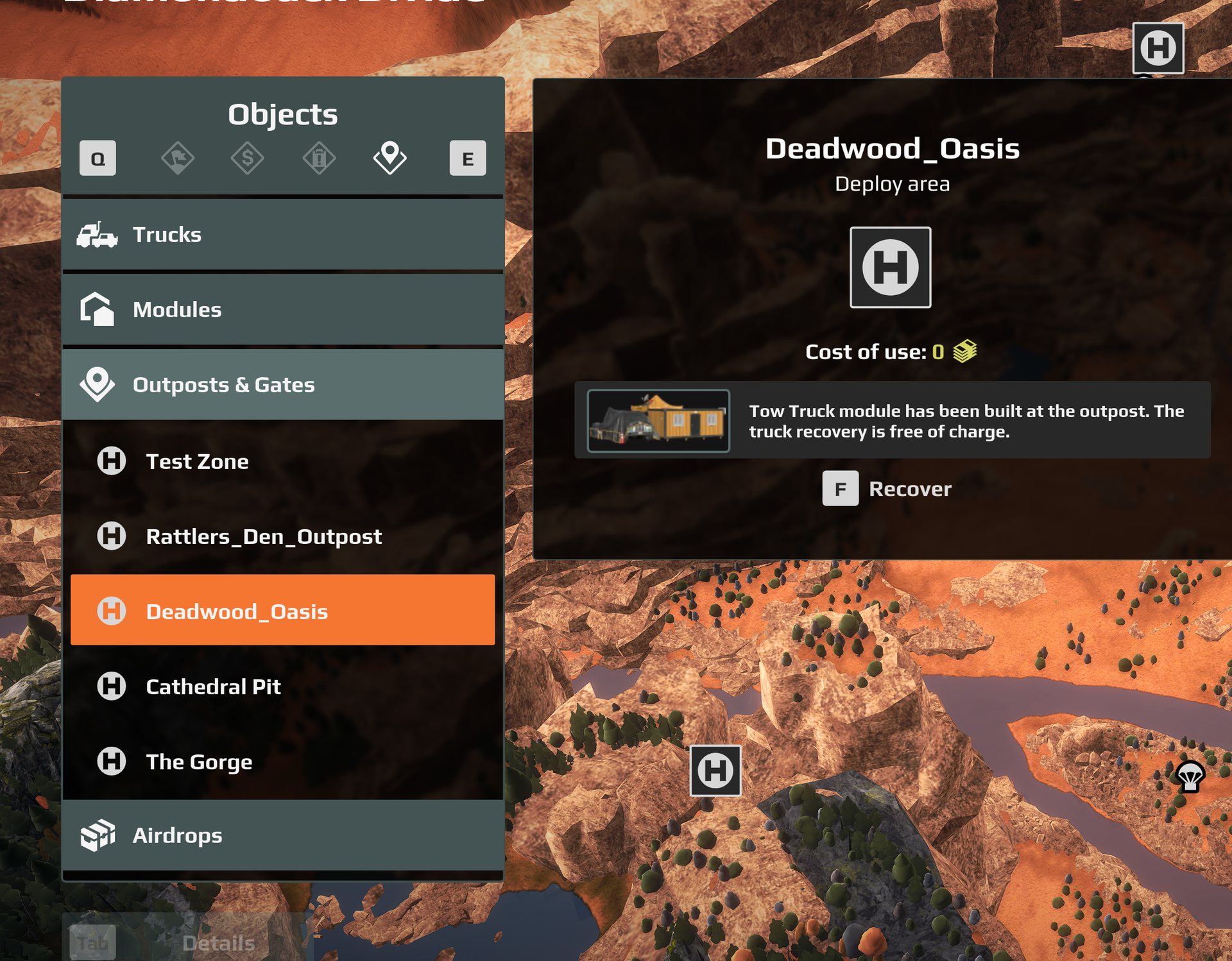
Recovery#
A base does not offer Recovery unless you add it. Put a ZonePropertyRecovery prop
on the deploy zone. In Expeditions this prop is for deploy zones only.
documented unverified
in game by this guide.
Recovery offered at a custom map’s deploy zone, in a running game. A Tow Truck module built at the outpost makes it free.
| Field | What it does |
|---|---|
fullyRepairTruck |
fully repair a truck recovered here |
refuelTruck |
fully refuel it |
restoreAddonRepairAndFuel |
refill the repair parts and fuel carried in the truck’s addons, including what was spent |
priority |
not used. The player picks where to recover to |
Checklist#
- one deploy zone with
defaultDeployPointon, sitting just above flat ground - an Id with no spaces, identical in the editor and in Zone Settings
zoneDiscoverabilityleft empty unless you mean the player to find the zone- for a Base module: a storage prop with
isAtDeployZone,alwaysSpawnand a capacity above 0, plusmainBaseModuleInteractionZonepointing at the zone itself - for a Store:
supplyShopModuleInteractionZonepointing at the zone itself - for each module slot: an empty placement zone, an interaction zone with
ZonePropertyBaseBuildinglinking to it, and afobModulesZonesrecord naming both - after packing, check every zone still has its props