Custom specialists#
A specialist is a crew member the player hires at the Team recruitment screen before an expedition. The player has three crew slots. Each specialist carries a set of passive abilities (more armor, a longer winch, cheaper repairs, a bigger drone range) that apply for the whole run.
A custom specialist is a small mod: one descriptor file that holds the name, the story, the hiring cost and the abilities, plus three PNG portraits. It is the simplest custom entity in the game to get working, and also the easiest to get silently wrong. Almost every mistake on this page produces a specialist that loads, hires and works, and simply shows nothing in one place.
Everything below was measured against the shipped game and confirmed on the hire screen with several custom specialists, unless a line says otherwise.
Appendix B lists every shipped specialist
Every specialist has the six classes, all 25 shipped specialists with their exact values, every descriptor setting, and every ability with its fields and the shipped specialists that carry it.
What a specialist mod contains#
Documents\My Games\Expeditions\Media\Mods\
  SpecialistDesc_<id>\              source folder the editor saves to
    SpecialistDesc                  the descriptor (JSON, no file extension)
    ui\textures\<name>_bage.png     364 x 364  badge portrait
    ui\textures\<name>_bg.png       380 x 92   list strip
    ui\textures\<name>_bgSmall.png  124 x 52   slot strip
  SpecialistDesc_<id>.pak           what the game actually loads
The .pak is a plain zip of the same files. The game reads the paks in the root of
Media\Mods; the folder is only the editor’s working copy.
documented
You make one in the editor: EXP MODs creation on the toolbar, then File > New Mod > Specialist, fill in the fields, File > Save, then File > Pack. Restart the game to see a new pak. documented
"Can’t open file" on the first save
The editor does not create Media\Mods by itself. If it does not exist yet,
the first save fails with Can't open file: .... Create the folder by hand,
or pack any map once, which creates it. documented
The id you type in the name field may use only Latin letters, digits and underscores, no spaces. documented
The descriptor#
The descriptor is JSON. Its top level names the type, and SslValue holds the
settings:
{
    "SslType": "SpecialistDesc",
    "SslValue": {
        "name": "SpecialistSettings",
        "speciality": 0,
        "rang": 0,
        "cost": 1600,
        "isLocked": false,
        "isLockedByDlc": false,
        "upgradeToUnlock": "",
        "uiName": "What the crew calls them",
        "uiDesc": "The story shown on the card.",
        "bage": "myguy_bage",
        "bg": "myguy_bg",
        "bgSmall": "myguy_bgSmall",
        "modifiers": [ ... ]
    }
}
| Field | What it does | Rule |
|---|---|---|
speciality |
The class tab the specialist is listed under | An integer. See the table below. Never 6. |
cost |
Hiring price | Vanilla runs from 500 to 3000. |
isLocked |
Hidden until an objective reward unlocks it | Leave false. See Locking. |
isLockedByDlc |
Tied to a paid DLC | Leave false. |
rang, upgradeToUnlock |
Unused | Saber marks both as unused and slated for removal. Leave 0 and "". |
uiName |
The name on the card | 20 characters including spaces. This limit is real. |
uiDesc |
The story on the card | Saber says 280 characters. That is not enforced: a specialist with a 519-character story renders in full. |
bage, bg, bgSmall |
The three portraits | The PNG file name, without the folder and without .png. |
modifiers |
The abilities | A list. See Abilities. |
Saber’s guide also lists dbg_hided, a debug switch that hides the specialist
from the recruitment screen and is slated for removal. Do not set it.
Speciality#
The editor shows names; the saved JSON stores the position in this list.
| Value | Class |
|---|---|
0 |
MECHANIC |
1 |
LOGISTICS_SPECIALIST |
2 |
HYDROLOGIST |
3 |
JAEGER |
4 |
OPERATOR |
5 |
MANAGER |
6 |
NONE: crashes the game documented |
Saber’s guide spells the second one LOGISTIC_SPECIALIST. The editor schema and the
game’s own data say LOGISTICS_SPECIALIST.
The class only decides which tab the specialist sits under. There is no link between class and abilities: any class can carry any modifier. documented
Editing only SpecialistDesc.json changes nothing
The descriptor the game reads is the entry with no extension,
SpecialistDesc. Some paks also carry a SpecialistDesc.json copy, some do
not. If you edit a pak by hand, write every copy that exists and make sure they
are identical. Otherwise you change a value, see no effect, and conclude the
field does not work.
Abilities: the modifiers#
Each ability is a modifier: an object in the modifiers list with a type and
its own numeric fields. The set of modifier types is fixed by the game. A
specialist may hold each type once. documented
A modifier has three kinds of content:
- The values, for example
armorEngineIncreasedPercent: 95. These are what change the game. - The label for each value, a
...UiDescobject holding the text the card prints beside the number. - The group, the heading and icon the card files the ability under.
One modifier, written out in full:
{
    "$type": "SpecialistModifierWheelDroneZone",
    "name": "SpecialistModifierWheelDroneZone",
    "group": {
        "$type": "SpecialistModifierGroupUiDesc",
        "icon36": "specAbilityWheels36",
        "text": "Ground Drone"
    },
    "overrideUiDesc": null,
    "allSameUiDesc": null,
    "wheelDroneZoneIncreasedPercent": 125,
    "wheelDroneZoneIncreasedPercentUiDesc": {
        "$type": "SpecialistModifierUiDesc",
        "hidden": false,
        "icon30": "",
        "text": "Increase zone coverage radius by",
        "valuePrefix": " +",
        "valueType": 2
    }
}
valuePrefixis printed before the number, usually" +"or" -".overrideUiDescreplaces all the per-value labels with one line for the whole ability.allSameUiDescis the same idea for a modifier whose values are all equal.icon36in the group must be one of the game’s ability icons, listed below.icon30is left empty in every working custom specialist.
Suffixes tell you the unit. ...Percent is a percentage, ...Meters is in-game
meters, ...Count is a quantity. Fields without one are switches or special
values. documented
The ability icons#
These 21 names are valid for group.icon36. Saber never listed them; they come
from the game’s own specialist records.
specAbilityAddonFuel36   specAbilityAirdrop36     specAbilityAnchor36
specAbilityArmor36       specAbilityBinocular36   specAbilityDrone36
specAbilityDroneGround36 specAbilityEcho36        specAbilityEngine36
specAbilityFord36        specAbilityFuel36        specAbilityJackscrew36
specAbilityMoney36       specAbilityOutposts36    specAbilityRecovery36
specAbilityRepair36      specAbilityShortcut36    specAbilityTrucks36
specAbilityUphills36     specAbilityWheels36      specAbilityWinch36
Every modifier and its fields#
The schema defines 47 modifier types. Write the field names exactly as below,
misspellings included: Consumpion, Suspencion, Inceased, Guaranted are the
real names, and a correctly spelled field is ignored. In the JSON the type is
SpecialistModifier plus the name in the first column.
| Modifier | What it does | Fields |
|---|---|---|
AdditionalAddonSupplies |
More fuel, parts, wheels in consumable addons | additionalAddonFuelCount, additionalAddonRepairsCount, additionalAddonWheelsCount |
AdditionalDeployResources |
More fuel, parts, wheels at every open deploy zone | additionalDeployFuelCount, additionalDeployRepairsCount, additionalDeployWheelsCount |
AdditionalReward |
Bigger money rewards | additionalRewardExpeditionIncreasedPercent, additionalRewardSideQuestsIncreasedPercent (contracts), additionalRewardTasksIncreasedPercent |
AdditionalTreasureItems |
Extra treasure items in resource zones | additionalTreasureItemsCount, additionalItem |
AirdropReroll |
Pay to reroll an airdrop | airdropRerollCost, airdropRerollLootLists |
AnchorRadius |
Bigger anchor placement radius | anchorIDs, anchorRadiusIncreasedPercent |
AnchorSupplies |
More anchor charges | anchorIDs, anchorMaxLimitCount |
ArmorCapacity |
Raises the armor cap on four truck parts | armorEngineIncreasedPercent, armorGearboxIncreasedPercent, armorGasTankIncreasedPercent, armorSuspencionIncreasedPercent |
ArmorRestoreEverywhere |
Add armor anywhere (no fields) | none |
BinocularRadius |
Bigger binocular reveal | binocularFullRadiusIncreasedMeters, binocularPartRadiusIncreasedMeters |
DroneAcceleration |
Faster air drone | droneAccelerationIncreasedPercent, droneAccelerationHeightIncreasedPercent |
DroneControllability |
Air drone handling | droneControllabilityResForceIncreasedPercent, droneControllabilityResForceRotationIncreasedPercent, droneControllabilityForceRotationIncreasedPercent |
DroneDiscoverScoutZones |
No fields. No vanilla specialist uses it; never observed. | none |
DroneHeight |
Higher air drone ceiling | droneHeightIncreasedMeters |
DroneItemSetup |
Air drone item placement | droneItemSetupSettings |
DroneMaxSpeed |
Higher air drone top speed | droneMaxSpeedIncreasedPercent |
DroneRadius |
Longer air drone range | droneRadiusIncreasedMeters |
DroneScoutRadius |
Bigger air drone reveal | droneFullScoutRadiusIncreasedMeters, dronePartScoutRadiusIncreasedMeters |
DroneTrade |
Trade by air drone (no fields) | none |
EcholotModeAura |
Echo sounder becomes an aura around the truck | echolotRadiusOverrideMeters, echolotStepCountOverride, echolotApplicationAdditionalTime |
EcholotModeCone |
Echo sounder becomes a cone ahead | echolotRadiusOverrideMeters, echolotStepCountOverride, echolotConeAngle, echolotApplicationAdditionalTime |
EcholotModeSnow |
Echo sounder measures snow | echolotRadiusOverrideMeters, echolotStepCountOverride |
ElectricityConsumption |
Less charge used | wheelDroneElectricityConsumptionReducedPercent, wheelDroneAbilityElectricityConsumptionReducedPercent, metaldetectorElectricityConsumptionReducedPercent, radarElectricityConsumptionReducedPercent |
EmergencyStockSupplies |
Bigger emergency stock in the truck | emergencyStockFuel, emergencyStockRepairs, emergencyStockWheels |
EmergencyWinch |
Winch with the engine off but not broken | winchFuelPerMinute |
EngineUnderwaterDamage |
Less engine damage underwater | engineUnderwaterDamageReducedPercent |
FogOfWarTranspRadius |
Bigger reveal around the truck | fogOfWarRadiusInceasedMeters, fogOfWarTranspRadiusInceasedMeters |
FreeEvacuation |
Free evacuations | freeEvacuationMaxLimitCount |
FuelConsumption |
Less fuel used | fuelConsumpionReducedPercent |
GuaranteedAirdropResource |
Airdrops always hold some resources | guarantedAirdropFuelCount, guarantedAirdropRepairCount, guarantedAirdropWheelCount |
ImproveWinchedTruck |
A driverless truck being winched gets stronger | engineResponsivenessIncreasedPercent, torqueIncreasedPercent, fuelConsumptionReducedPercent, onModelFrictionIncreasedPercent, bodyFrictionAsphaltIncreasedPercent, substanceFrictionIncreasedPercent, bodyFrictionIncreasedPercent |
ItemCost |
Cheaper items | itemCostReducedPercent |
ItemSellPrice |
Items sell for more | itemSellPriceIncreasedPercent |
JackscrewSupplies |
More jack screw charges | jackscrewMaxLimitCount |
MayDiscoverZones |
Can identify zones flagged for this class | mayDiscoverZonesByBinocular, mayDiscoverZonesByDrone (switches) |
RepairBuildingConsumption |
Fewer parts to repair bridges and clear debris | repairBuildingConsumptionReducedPercent, repairBuildingConsumptionDesc |
RepairConsumption |
Fewer parts per repair | repairConsumpionReducedPercent |
TreasureItemSellPrice |
Treasure sells for more | treasureItemSellPriceIncreasedPercent |
TruckDamage |
Less damage to truck parts | truckDamageEngineReducedPercent, truckDamageGearboxReducedPercent, truckDamageGasTankReducedPercent, truckDamageSuspensionReducedPercent, truckDamageWheelReducedPercent |
UnderwaterAnchorSetup |
Place anchors underwater (no fields) | none |
WheelDroneArmor |
Armor on the ground drone | wheelDroneArmorEngineIncreasedPercent, wheelDroneArmorBatteryIncreasedPercent, wheelDroneArmorSuspencionIncreasedPercent |
WheelDroneArmorRestoreEverywhere |
Repair ground drone armor anywhere (no fields) | none |
WheelDroneFriction |
Ground drone grip | wheelDroneOnModelFrictionIncreasedPercent, wheelDroneBodyFrictionAsphaltIncreasedPercent, wheelDroneSubstanceFrictionIncreasedPercent, wheelDroneBodyFrictionIncreasedPercent |
WheelDroneScoutRadius |
Ground drone reveal | wheelDroneFullScoutRadiusIncreasedMeters, wheelDronePartScoutRadiusIncreasedMeters |
WheelDroneTorque |
Ground drone torque | wheelDroneTorqueIncreasedPercent |
WheelDroneZone |
Bigger signal zones on the map | wheelDroneZoneIncreasedPercent |
WinchImprove |
Longer, stronger winch | winchLengthIncreasedMeters, winchPowerIncreasedPercent |
Where Saber’s guide disagrees with the game
Saber’s modifier page gives several field names the schema does not have. The schema is what the game reads; use its names.
| Saber’s guide | The real field |
|---|---|
anchorRadiusID |
anchorIDs |
winchFuelPerSecond |
winchFuelPerMinute |
droneMaxSpeedInceasedPercent |
droneMaxSpeedIncreasedPercent |
echolotModeSnowRadiusOverrideMeters, echolotModeSnowStepOverrideCount |
echolotRadiusOverrideMeters, echolotStepCountOverride |
wheelDrone...FrictionIncrecedPercent |
wheelDrone...FrictionIncreasedPercent |
Rules the game applies to values#
- Negative values reverse the effect.
anchorRadiusIncreasedPercent: -50shrinks the radius by half. Saber adds that this “does not work for all parameters with …Reduced in their names” and does not say which ones. documented Custom specialists with negative values have shipped and play as handicaps, but which...Reducedfields honour a negative has not been checked field by field. - Truck damage reduction stops at 100% per part, however many specialists stack it. documented
- Echo sounder modes do not stack. With several echo sounder modifiers in the crew, the game uses the first active specialist’s values only. documented
- Emergency stock values add up across specialists. documented
MayDiscoverZonesonly matters on maps whose zones are flagged as discoverable by a class. See Discoverability.
Armor: what the numbers mean in play#
ArmorCapacity raises the highest strength the player can repair a part to, above
the normal 100%. The player adds the armor the same way they repair: open the
vehicle status panel, pick the part, spend spare parts.
Measured in game, October 2026, with a custom specialist at +95% on all four
fields and no ArmorRestoreEverywhere:
| Where the truck is | Highest the engine, gearbox, fuel tank and suspension reach |
|---|---|
| Anywhere | 195% |
| Inside a Service station’s area | 215% (the station adds a fixed +20%) |
ArmorRestoreEverywhere was not needed
Saber’s example reads as if adding armor away from a station requires
ArmorRestoreEverywhere. In the test above the specialist’s +95% could be
added anywhere without it; only the station’s own +20% needed the station. What
ArmorRestoreEverywhere adds on top has not been tested. See
Service station.
How strong is strong: the vanilla numbers#
The 25 shipped specialists are stored as plain text in initial.cache_block
inside preload/paks/client/initial.pak. They are not in
initial_release.sslbundle, which is where people look and give up. Their names
are localisation keys (MECHANIC_05_UI_NAME), resolved through
[strings]/strings_english.str in the same pak, UTF-16LE.
The highest value any shipped specialist uses, for the common fields:
| Field | Vanilla best | Field | Vanilla best |
|---|---|---|---|
armor...IncreasedPercent (each) |
30 | truckDamage...ReducedPercent (parts) |
30 |
truckDamageWheelReducedPercent |
50 | repairConsumpionReducedPercent |
30 |
fuelConsumpionReducedPercent |
20 | repairBuildingConsumptionReducedPercent |
40 |
winchLengthIncreasedMeters |
10 | winchPowerIncreasedPercent |
30 |
torqueIncreasedPercent (winched truck) |
30 | winchFuelPerMinute |
20 |
droneRadiusIncreasedMeters |
200 | droneHeightIncreasedMeters |
20 |
droneMaxSpeedIncreasedPercent |
70 | droneAccelerationIncreasedPercent |
70 |
binocularPartRadiusIncreasedMeters |
150 | binocularFullRadiusIncreasedMeters |
100 |
wheelDroneTorqueIncreasedPercent |
50 | wheelDrone...FrictionIncreasedPercent |
200 |
wheelDroneZoneIncreasedPercent |
50 | wheelDroneArmor...IncreasedPercent |
30 |
additionalDeployRepairsCount |
200 | additionalDeployFuelCount |
100 |
guarantedAirdropFuelCount |
50 | emergencyStockRepairs |
50 |
itemSellPriceIncreasedPercent |
30 | additionalRewardTasksIncreasedPercent |
30 |
anchorMaxLimitCount |
5 | jackscrewMaxLimitCount |
2 |
Costs run from 500 to 3000. 24 of the 25 are locked behind progression.
Balancing that has held up
The tested custom specialists were balanced against those numbers with two rules that worked:
- Trade, don’t just add. A specialist strong on one axis and weaker than
vanilla on another (a negative value) is a choice, not a free upgrade. Two
specialists built as a pair, one holding a field at
+90and the other at-40, net+50only when both seats are filled. - Run-deciding stats stay closest to vanilla. Torque and armor decide whether a crossing works, so a pair’s combined value sat near 2x vanilla’s best there. Information (reveal radius, guaranteed airdrops) went nearer 2.5x.
Two specialists holding the same field by accident is a clash, not a feature. Check what a new character is for against the roster, not only which fields it writes: two pairs with no shared fields can still be doing the same job.
When an ability works but never appears on the card#
The specialist hires, the stat applies in the run, and the hire screen draws no line for it. No error, no placeholder. From inside the game a missing label looks exactly like an ability you forgot to add. There are four causes.
1. The label field’s name is misspelled, by Saber#
A label whose field name the schema does not define is thrown away on load.
Never build a label name as field + "UiDesc". Saber misspelled three of them,
so the obvious spelling is the broken one:
| Value field | Its label field, as the schema spells it |
|---|---|
winchLengthIncreasedMeters |
winchLenghtIncreasedMetersUiDesc (“Lenght”) |
additionalAddonFuelCount |
additionalAddonFuelCountCountUiDesc |
additionalAddonWheelsCount |
additionalAddonWheelsCountCountUiDesc |
additionalAddonRepairsCount |
additionalAddonRepairsCountUiDesc (normal, which is what makes it a trap) |
A sweep of thirteen specialists found 21 invented label names, three of them carrying text that had never once been drawn.
2. The value has no label at all#
A numeric field with no ...UiDesc still takes effect and never shows. A group
alone is not enough.
3. The modifier will not draw per-value labels#
Three modifiers ignore per-value labels however correct they are. Each needs the shape vanilla uses:
| Modifier | What works |
|---|---|
ImproveWinchedTruck |
One overrideUiDesc line, no per-value labels. Its schema has no per-value label fields at all. |
EmergencyWinch |
A group and no value label. |
RepairBuildingConsumption |
The label goes in repairBuildingConsumptionDesc, a field with a non-standard name. |
That list is what was seen on cards, not a rule. Other modifiers that vanilla
also writes with overrideUiDesc (WinchImprove, ArmorCapacity,
DroneAcceleration, BinocularRadius) draw per-value labels perfectly on custom
specialists. Why those three differ is not known. Do not extend the list by
analogy; add to it only after seeing a card with the line missing.
4. An empty prefix prints junk#
valuePrefix: "" does not mean “no number”. It means “a number with no prefix”, so
the game prints its separator and whatever it finds. Seen on cards:
Empowers the vehicle in tow,null
Drone armor repairs anywhere,
The first of those, on a custom specialist’s card in the recruitment screen.
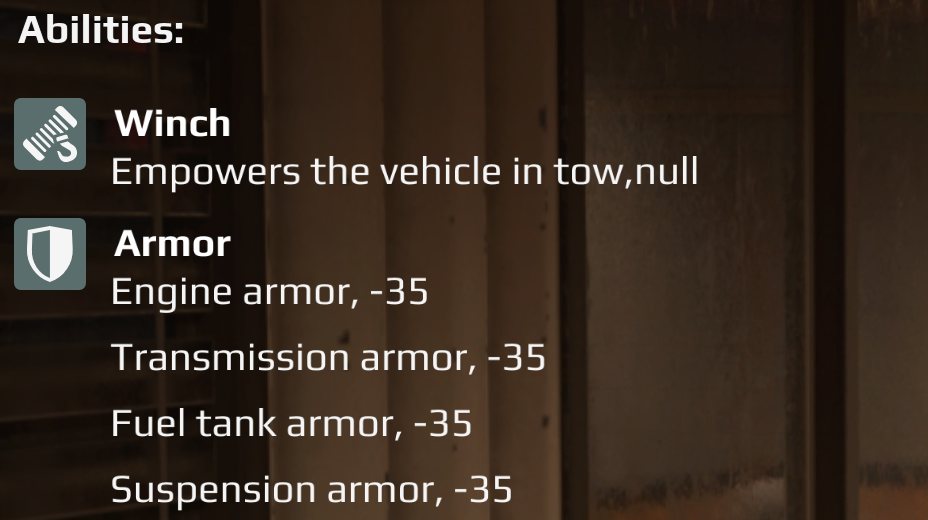
For a line that shows no number (a switch, or an override sentence), leave
valuePrefix and valueType out of the label entirely. Vanilla’s own
switch-only modifiers carry no prefix or type at all.
Some vanilla values are deliberately unlabelled
Vanilla leaves some values off the card on purpose, for example both
WinchImprove values and the echo sounder’s added time. Adding a label there
is a design choice, not a fix.
The three portraits#
Each specialist needs three PNG images, all with transparency, all in
ui\textures\ inside the mod.
| Field | Canvas | Where it appears |
|---|---|---|
bage |
364 x 364 | The badge on the recruitment card |
bg |
380 x 92 | The specialist list at Team recruitment, and the team list at Expedition setup |
bgSmall |
124 x 52 | The row of crew slots at the top of the recruitment screen |
The badge is 364 x 364, not the 293 x 293 Saber’s guide says
The slot grew in an update and the guide never caught up. Every vanilla badge in the game’s UI library measures 364 x 364.
The game draws the badge at its own pixel size, anchored top left, and never scales it. A 293 px badge covers about 80% of the slot and sits high and left, with bare card showing on the right and below. That looks like bad framing. It is the wrong canvas. Make it 364 x 364 and it fills the slot.
bg at 380 x 92 and bgSmall at 124 x 52 are correct as documented.
All three need alpha#
An opaque image renders as a solid photo block filling the slot.
Save as 32-bit RGBA even when the art has few colours. Across the mods on the test install, every image confirmed showing in game (34 of them, every specialist portrait and item icon among them) is RGBA, and the images that never appeared were 8-bit palettised. unverified That is a correlation, not a test of a palettised portrait on its own, but RGBA costs nothing.
Framing the badge#
- The whole bust is in frame.
- Both shoulders inside the canvas, with backdrop visible either side.
- A margin of empty backdrop above the head.
- The bust runs down to the bottom edge.
The failure this prevents: a badge cropped so tight the head fills the frame and both shoulders run off the sides.
Framing the two strips#
The strips are not the badge scaled down. Each is a tighter crop of the head, sitting in a small content box at the left of a mostly transparent canvas:
| Field | Canvas | Content box |
|---|---|---|
bg |
380 x 92 | 115 x 92, at x 23, y 0 |
bgSmall |
124 x 52 | 67 x 52, at x 27, y 0 |
Everything outside the box stays transparent. That is how the shipped strips are built.
- Cut one crop and resample it for both strips. Two separately cropped strips disagree with each other. Strip pairs that look right match each other almost exactly (a 0.99 correlation was measured), which is how they were made.
- Size the crop by the head’s height, with the head at about 80% of the content box’s height, and let the width follow the box’s shape. Do not size it by the head’s width: a hard hat and a pair of goggles give wildly different widths, and the same rule then gives a tiny face in one portrait and a face clipped at the chin in the next.
- Measure the head’s width only across the crown-to-brow band, not at chin level, where a broad character’s shoulders are already in the row.
- Take the top of the head from the image, the topmost opaque row above the face, not from a guess about how tall the headgear is.
Check the result against a checkerboard background and look at it. Automated “defect” counters have reported thousands of fringe pixels that turned out to be freckles and a copper wire coil.
Getting art that matches the game#
The vanilla portraits sit between photoreal and cartoon: painted, believable, restrained lighting. What was learned getting there with an image generator:
- Describing the style in words does not work. The wording lands on photoreal or on animated-film cartoon, never between.
- Restyle against references instead. Give the generator two existing badges in the target style plus the portrait to redraw, with a short instruction (about sixty words): match the rendering of images 1 and 2, keep the person, pose and clothing of image 3. Long descriptions drown the references.
- Say what you want, never what you don’t. There is no negative channel; naming a thing tends to draw it.
- Generate on a flat pale grey backdrop, then cut it out. Cutting off a dark backdrop drags its colour into the hair edges and leaves grey hair muddy.
- Ban lettering several ways. Caps, patches and hi-vis are where text sneaks in.
- Do not reuse a visual shorthand (the same grease smear, the same prop) across characters, or they come out looking like a matched set.
Building a pak yourself#
The editor’s Pack writes correct paks. If you build or edit a pak with your own tools instead, two things matter.
A zip extra field in the local headers blanks every portrait
Python’s zipfile writes ZipInfo.extra into each file’s local header as
well as the central directory. The game’s reader does not skip the local extra
field, so it starts reading 36 bytes early and the image fails to decode.
The symptom is not “the mod is broken”. The descriptor happens to carry no extra field, so the specialist appears with the right name, story, cost and every ability, and only the three picture slots are empty. That reads as an art problem and sends you looking in the wrong place.
Never copy extra when rewriting entries. zipfile only shows you the central
directory, so a check built on it will pass this defect; walk the local headers
to verify.
- Keep the extensionless
SpecialistDescand anySpecialistDesc.jsontwin identical.
Locking#
isLocked: true hides the specialist until an objective grants it with an unlock
reward. Saber’s guide says to lock a specialist only when it ships as a linked mod
alongside the map that unlocks it. documented
A locked specialist with no reward wired to it can never be hired. Leave it
false unless you have the objective. Locking and unlocking a custom specialist
has not been tested here. See Rewards.
An unlocked custom specialist is on the first recruitment screen, with no rank or unlock. Since 24 of the 25 vanilla specialists are locked, that availability is itself worth something: a specialist that only matches a vanilla one still lets the player have it twenty hours earlier.
Publishing#
Pack writes six zips, one per platform, each holding the same pak plus a zero-byte marker file named after the platform. Saber’s guide says uploading works the same way as for truck mods. documented For what packing does in general, see Packing your map.
- The names do not match across the chain: the zip suffix and marker
pciswindowsin mod.io’s API,nx64isswitch,playstation_4isps4,playstation_5isps5,xbox_oneisxboxone,xbox_seriesisxboxseriesx. A file tagged with the wrong platform uploads with no error. - Console files go to Saber’s review queue rather than going live.
- mod.io’s tag for this type is
Specialist.
Checklist when something is missing#
| You see | Cause |
|---|---|
| Name, story and abilities fine, all three portraits empty | Zip extra field in the local headers (hand-built pak). Also check the PNGs are RGBA. |
| Badge sits high and left with bare card showing | Badge is 293 x 293; make it 364 x 364 |
| Portrait is a solid rectangle | No transparency |
| You edit a value and nothing changes | You edited SpecialistDesc.json; the game reads SpecialistDesc |
| An ability works but has no line on the card | Misspelled or missing label, or one of the three modifiers that need vanilla’s shape |
A line ends in ,null or a bare comma |
valuePrefix: "" on a line with no number |
| Game crashes when the specialist loads | speciality is 6 (NONE) |
| Specialist never appears for hire | isLocked: true with no reward that unlocks it |